

Somebody searched for aircon cleaning job. They wanted employment, not a cleaner. The advertisement appeared, they tapped it, they left within seconds, and the business paid for the click at the going rate for a commercial search. That happens several times a week in a lot of accounts, and nobody inside the business ever sees it, because the money leaves in single clicks rather than in one visible sum.
The fix for that is a negative keyword list, and it is one of the few things in advertising that a business owner can do without help. The difficulty is not technical. It is that the advice available is mostly wrong in a way that costs money.
Search for it and the first page offers you a list. Four hundred terms from one site, fifteen hundred from another, with instructions to paste them in and see an immediate improvement. Practitioners who run small accounts for a living say the opposite, and they are right. The terms worth excluding are sitting in a report that only you can open. A borrowed list will block searches that would have bought from you.
In short
- The list worth having comes out of your own account, not out of somebody’s download.
- A borrowed list blocks searches that would have bought from you, and you never find out, because a search you have blocked reports nothing at all.
- Negative keywords do not behave like normal keywords, and the difference is where people take down their own campaign.
- Small budgets feel this most, because the waste is a share rather than a sum.
Before you start
You do not need a specialist and you do not need to understand bidding. You do need four things:
- Access to the Google Ads account itself, not a monthly report somebody sends you. Step one is about establishing whether you have it.
- A search campaign that has been running long enough to have spent something. A fortnight is the minimum worth looking at.
- A spreadsheet, or a sheet of paper.
- About an hour for the first pass, and twenty minutes a month afterwards.
One honest note on scale before you spend the hour. This is a lever, not a rescue. It recovers money that is currently being wasted, which on a small budget is worth having. It will not fix a campaign that is pointed at the wrong service, sending people to a page that does not answer them, or bidding on a phrase nobody buys from. If the campaign has never worked at all, the negative keyword list is not the reason.
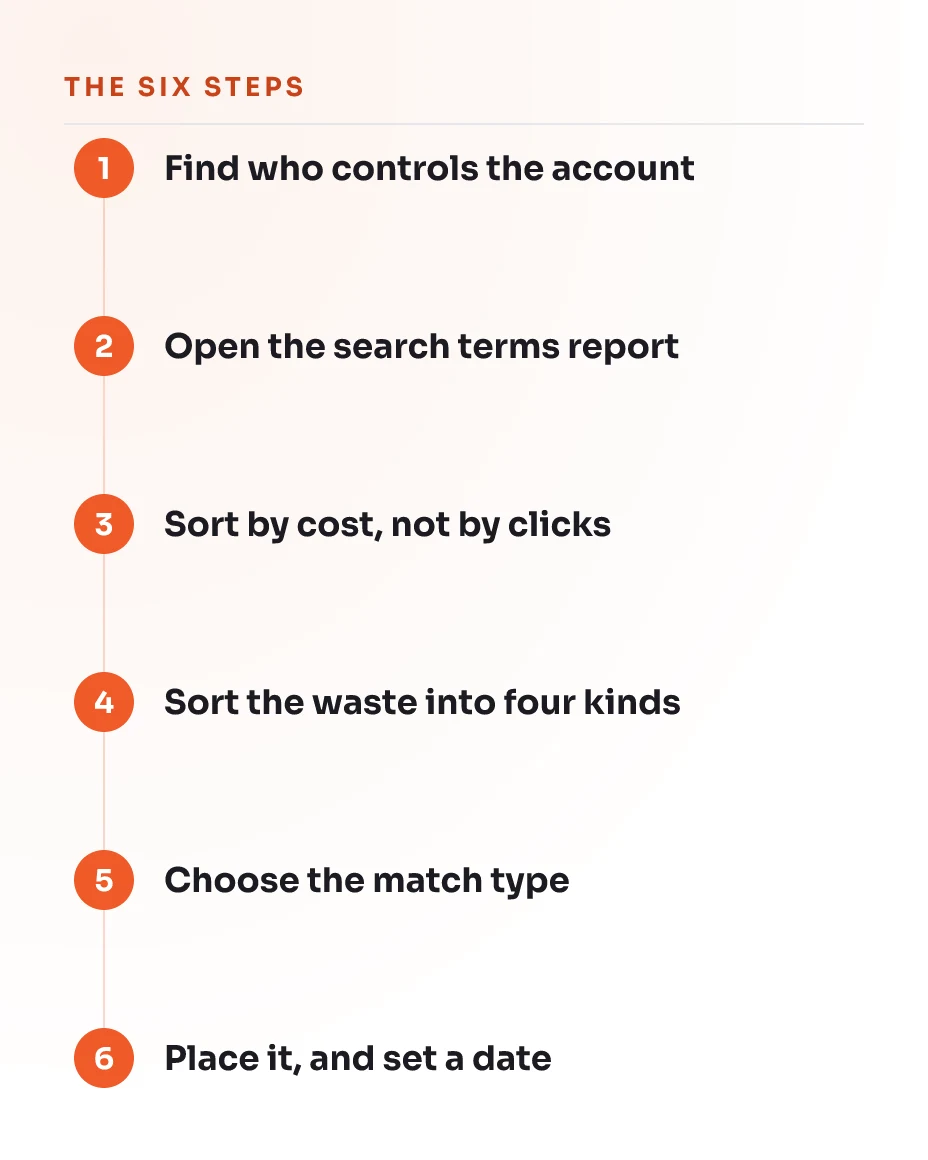
Step 1: Find out who controls the ad account
Afterwards you know whether you can do this work at all, and a number of readers will discover the answer is no.
The search terms report is the whole of this guide, and it does not exist for somebody who cannot sign in. In this market the account is very often held by whoever set it up, which might be a freelancer, an agency, a relative, or a person nobody has spoken to in two years. A monthly PDF is not access. Neither is a screenshot.
- Go to the Google Ads sign in page and sign in with the email address you believe owns the account. Not through a link somebody sent you.
- Open Admin, then Access and security, and look at the list of people. Find your own email address and read what it says next to it.
- Check the level. Admin can add and remove people. Standard can change campaigns. Read only can look. Email only can do nothing at all, and it is the level a surprising number of business owners turn out to have.
- Look at who else is on that list, and whether you recognise all of them.
Check it worked when you can sign in without asking anybody for anything, and see what the account spent last month. If you cannot, stop here. Getting your name onto the account is a more valuable hour than anything below it, and it is the thing to sort out before another peso is spent.
Step 2: Open the search terms report and widen the dates
When this is done you are looking at the actual phrases people typed, which is a different list from the keywords you chose.
This distinction is the whole reason the report exists. Your keywords are what you bid on, in the pay per click sense that you are charged when somebody taps. Search terms are what people actually typed to make your advertisement appear. Google matches one to the other, generously, and the gap between them is where the money goes.
- Open Campaigns, then Insights and reports, then Search terms.
- Change the date range. The default is short and a short range on a small budget shows you almost nothing. Set it to the last three months, or to the whole life of the campaign if it is younger.
- Add the columns you need if they are not showing: cost, clicks, impressions and conversions.
- Accept that the report is incomplete. Google withholds terms searched by very few people for privacy reasons, so the report shows you most of the waste rather than all of it. Our entry on the search terms report covers what else it holds.
Check it worked when you are looking at a list of phrases that includes at least one you would never have thought of. There is always at least one. Our guide to keyword research covers the other half of this, which is choosing the words you do want.
Step 3: Sort by cost, not by clicks
Afterwards your attention is on the searches that took the most money rather than the ones that appeared most often, and those are rarely the same rows.
Sorting by clicks is the natural instinct and it is the wrong one. A term with forty cheap clicks may have cost less than a term with four expensive ones, and the expensive ones are usually the commercial phrases where a wasted click costs the most.
- Click the cost column to sort by it, highest first.
- Read the top thirty rows. That is where the money is, and it is a short enough list to think about properly.
- Mark every row where the person typing it could not have become a customer.
- Leave everything with a conversion against it alone, whatever it looks like. A search that has produced business is not waste, however odd it reads.
Check it worked when you have thirty rows read and somewhere between five and fifteen marked. If you have marked almost everything, you are being too aggressive and step five will tell you so. If you have marked nothing, either the campaign is unusually tight or the date range is still too short.
Step 4: Sort what you found into four kinds
When this is done every marked row has a reason attached, and the reason decides what you do with it. This is the step that separates a list built from evidence from a list copied off a website.
Not everything on that list should be excluded, and treating the four kinds as interchangeable is how a business blocks its own customers.
The wrong job
Somebody searched for something you do not sell. An aircon cleaning company appearing for aircon installation, or a repair company appearing for a brand of unit they do not service. The person was real and their intention was commercial. It simply was not your business.
Safe to exclude, and this is usually the largest group.
The wrong person
Somebody searched with no intention of buying from anybody. Job, hiring, salary, career, training, course, tutorial, how to, DIY, and the name of your trade followed by the word jobs. Students, jobseekers and people intending to do it themselves.
Safe to exclude, and worth doing at account level because it is wrong for every campaign you will ever run.
The wrong place
Somebody searched from or about somewhere you do not serve. A cleaning company in Cebu appearing for a search naming a town in Luzon.
Exclude with care. Place names in a search are not the same as the searcher’s location, and a person standing in Cebu may well be arranging something for a relative there while travelling. Check the location settings on the campaign before you start excluding place names, because the cause is usually there rather than in the keywords.
The wrong stage
Somebody is going to buy, but not today. Price comparisons, specifications, reviews, what is the difference between.
Do not exclude these without thinking hard. This is the group where borrowed lists do their damage. Somebody researching today is somebody buying in a fortnight, and on a small budget you may reasonably decide you cannot afford to pay for that visit. That is a budget decision, made deliberately, and it is not the same as the search being worthless.
Check it worked when every marked row has one of the four labels on it, and when at least one row you were about to exclude has moved into the fourth group and survived.
Step 5: Choose the match type, and check before you add
Afterwards each term is written the way you intend it, which matters more here than it does with normal keywords.
A negative keyword does not work like a positive one, and this is where people take down their own campaign. Our entry on match types covers how the positive side behaves, which is the comparison that misleads people here. Google does not apply close variants to negatives. Misspellings, plurals and different orderings are not covered, so excluding one spelling leaves the rest running.
Broad negative
Written plainly, with no punctuation: job. Blocks any search containing that word, in any order, alongside anything else.
This is the blunt instrument. It is right for the wrong person group, where a single word reliably marks a search as not yours. It is dangerous everywhere else, because a broad negative containing a word that also appears in your main keyword will block your main keyword.
Phrase negative
Written in quotation marks: "aircon repair". Blocks searches containing that phrase in that order, with anything before or after.
This is the one to reach for most of the time. Precise enough not to cause accidents, wide enough to catch the variations.
Exact negative
Written in square brackets: [aircon cleaning job]. Blocks that search and nothing else.
For a single expensive term you want gone without affecting anything near it.
Before you add anything, do one check. Read the term and ask whether any customer of yours could have typed it. If you can construct one plausible customer, use phrase or exact rather than broad, or leave it. Then check your broad negatives against your actual keywords, word by word, and remove any that appear in both.
Check it worked when you can say out loud, for each broad negative on your list, that no search containing that word could ever come from a buyer.
Step 6: Put the list where it belongs, and set a date
At the end of this the terms are excluded in a place where they will keep working, and there is something in the calendar to make sure it happens again.
- Create a named list rather than adding terms one at a time. Tools, then Shared library, then Negative keyword lists. A list can be applied to several campaigns and changed in one place.
- Put the wrong person group at account level, under Admin and Account settings. It is wrong everywhere and it belongs somewhere that applies everywhere.
- Apply the rest as a list against the campaigns it belongs to.
- Avoid ad group level unless you genuinely mean that one ad group. It is the narrowest place, the easiest to forget, and the reason people add a term and watch the same search appear again.
- Put twenty minutes in the calendar for a month from now, and repeat steps two to five. The words move. New products and new ways of asking arrive constantly.
Check it worked when you can open the negative keyword list, see your terms in it, and see which campaigns it is applied to. A week later, open the search terms report and confirm the excluded phrases have stopped appearing.
Common mistakes
- Pasting a downloaded list of several hundred terms. It was not built from your account, it will block searches that would have bought from you, and the loss is invisible.
- Excluding free and cheap. In this market free quote, free estimate and cheap followed by your service are buying searches, and both words appear on nearly every published list.
- Deciding by clicks instead of by cost. The most expensive waste is rarely the most frequent.
- Broad negatives that contain a word from your own keyword. It reads as one harmless word and it takes the campaign down with it.
- Adding everything at ad group level, then wondering why the same search keeps appearing somewhere else.
- Doing it once. A list built a year ago is describing a market that has moved.
What success looks like
A month after the first pass, you should be able to say all of this:
- You can sign in to the ad account yourself and see what it spent.
- The top thirty search terms by cost have all been read, and each wasted one has a reason attached rather than just a mark.
- The list is in the shared library with a name, applied where it belongs, with the wrong person group at account level.
- No broad negative on the list contains a word that appears in your own keywords.
- At least one term you nearly excluded is still running, because you worked out that a real customer could have typed it.
- There are twenty minutes in the calendar for next month.
None of that needs a specialist, and the money it recovers is money that was already yours. What it cannot do is make a campaign work that was never pointed at the right thing, and it is worth knowing the difference before you spend the hour. The article on the searches you pay for and never chose covers why the gap between a keyword and a search exists in the first place, and is the other half of this.
The honest limit
When to stop doing it yourself
Everything above is one evening inside a search campaign, and for most small accounts it is the whole job. Four things are not taught here and are not beginner work. Excluding traffic from Performance Max and AI Max campaigns behaves differently from a search campaign and the controls are partial by design, so what works in one will not do what you expect in the other. Scripts and the Google Ads API can maintain lists automatically, and an automation that excludes the wrong thing does it silently across every campaign at once. Auditing conflicts in an account with many campaigns and overlapping lists is a different job from building one list, and it is where negatives quietly cancel keywords somebody is still paying for. Anything touching bids or budgets is not a negative keyword decision at all, however much it looks like one from the same screen. If the account has grown past the point where one person can hold it in their head, that is the moment to ask somebody, and not before.
Questions we get
Questions we get about this
Can I just download a list of negative keywords and paste it in?
How often should I do this?
Should negative keywords go at account level or campaign level?
Do negative keywords work the same way as normal keywords?
My campaign is new and the report is almost empty. What now?
Does any of this matter on a small budget?
Read next
How to do keyword research for free: six steps, no paid tools
A step-by-step method for finding the words your customers actually type, using only the free tools Google gives away. For owners with no software budget.
Why is my website slow: six checks before you pay anyone
How to find what is actually slowing your website down, in an afternoon, without a developer. For Philippine owners whose customers are on mobile data.